 CSS Glance
See the size, colors, fonts and CSS of anything on a page.
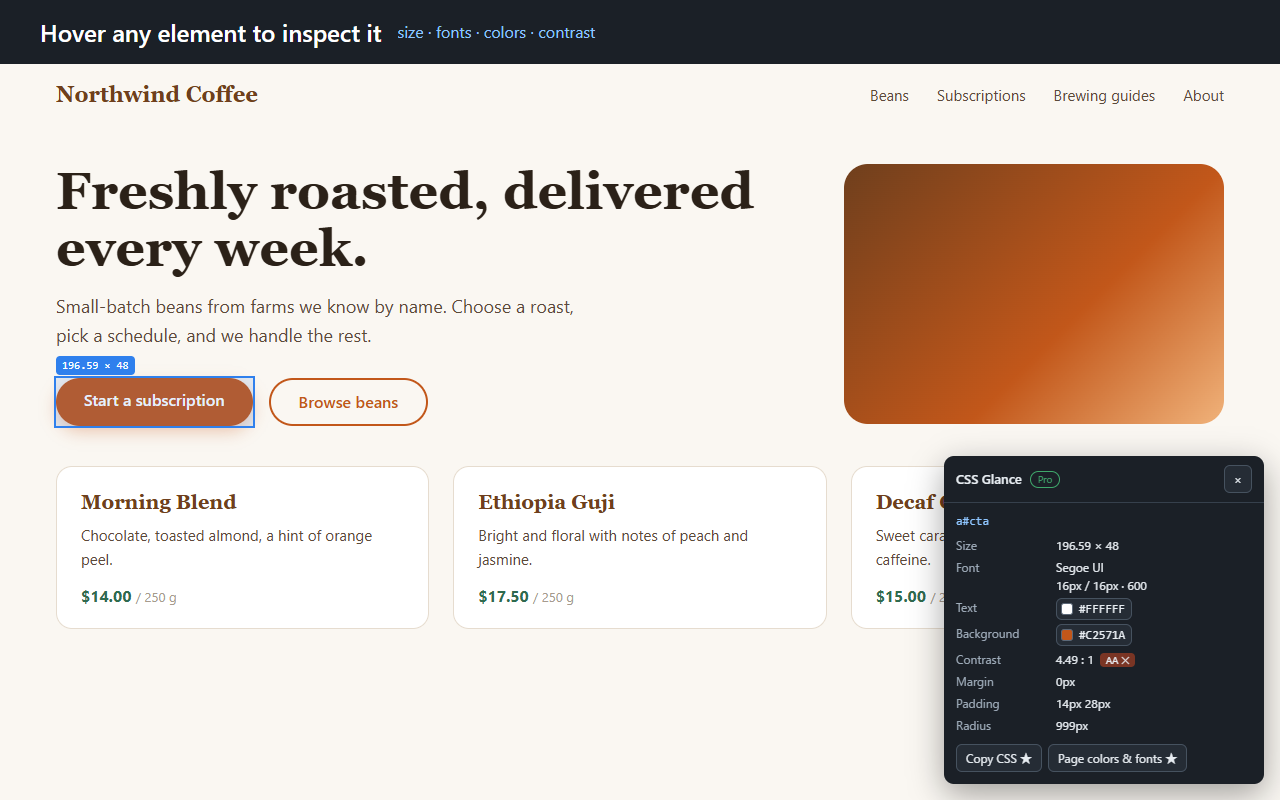
CSS Glance is a small Chrome extension for people who build websites. Click the icon, hover an element, and the essentials appear in a tidy panel. No DevTools digging.
The core features are free. No account needed. For desktop Chrome.
Right after you install
- Click “Add to Chrome” on the Chrome Web Store page.
- Open any website and click the CSS Glance icon (pin it from the puzzle-piece menu so it stays in view).
- Hover an element.
What you get for free
- Size and spacingWidth × height, margin, padding and border radius of the element under your cursor.
- FontsFont family, size, line height and weight.
- Colors, one click to copyText and background colors as hex codes. Click a color to copy it.
- Contrast checkThe contrast ratio between text and its real background (semi-transparent layers included), with a WCAG AA / AAA result.
- Pin an elementClick to keep an element selected. Links and buttons on the page are blocked while you inspect (some scripted elements may still react).
- Private by designNothing is sent anywhere. The extension only reads the page when you click its icon.
The AA / AAA result is a calculation aid, not a conformance certificate.
What Pro adds
- Copy CSSCopy an element's styles as a clean rule: only the properties that differ from the browser defaults, with shorthands such as
margin,borderandborder-radiuscollapsed. - Page colors and fontsThe colors, font families and font sizes found on the page, most used first.
- Measure gapsPin one element, hover another, and read the horizontal and vertical gap between them.
Pricing
| Feature | Free | Pro (one-time, JPY 1,980) |
|---|---|---|
| Size, spacing, fonts, colors | Yes | Yes |
| Contrast ratio with AA / AAA result | Yes | Yes |
| Copy colors, pin elements | Yes | Yes |
| Copy CSS | — | Yes |
| Page colors and fonts | — | Yes |
| Measure gaps between elements | — | Yes |
Pro is a one-time purchase: JPY 1,980 (Japanese yen; about US$13 as of October 2026). No tax is added at checkout. Pay once. No subscription.
Good to know
- The font shown is the first family in the element's font stack; the browser may fall back to a later one if that font is not installed.
- Content inside iframes from other sites cannot be inspected.
- Extensions cannot run on browser settings pages or on the Chrome Web Store.
Guides
Looking for an answer rather than a tool? Read our short guides on finding a website's font, checking WCAG color contrast, and copying an element's CSS.